Getting started
1. Get AhkWord
- On the Releases page, download the newest AhkWord-NN.zip, or AhkWord-NN-complete.zip if the computer may not have .NET 10 or isn't online (it has .NET inside).
- Unzip it anywhere you can write to: your Documents, a USB stick (not Program Files, which Windows keeps read-only).
- Double-click AhkWord.exe. Windows may say Windows protected your PC the first time, as AhkWord isn't signed: click More info, then Run anyway.
Everything AhkWord needs is in its folder: its libraries, the C# compiler's DLLs and AutoHotkey (AhkWord.exe is AutoHotkey v2, unchanged, under AhkWord's name; it is under the GNU GPL, its license and source link are in the zip, and the other parts' licenses are in THIRD-PARTY-NOTICES.md and licenses). Nothing is downloaded at the first start, and nothing is written outside the folder but your settings (see below); to remove AhkWord, delete its folder.
AhkWord runs on Microsoft's .NET 10 Desktop Runtime. If the computer has it, AhkWord uses it. If not, AhkWord asks the first time:
- Download it for AhkWord only (recommended): Microsoft's own files (about 70 MB), checked against Microsoft's checksums, go into AhkWord's folder (
dotnet). Nothing is installed in Windows and no administrator is needed. - Install it for all of Windows: Microsoft's download page opens; start AhkWord again once it is installed.
- Not now: AhkWord closes, and asks again next time.
The complete download has .NET in its dotnet folder already, so it asks nothing.
Keeping AhkWord's own .NET up to date. Microsoft fixes .NET about once a month, often for security, and Windows Update doesn't know about a .NET in AhkWord's folder. So, when AhkWord runs on its own dotnet folder, it looks at Microsoft's list of .NET 10 releases once a week, in the background (a small file, about 40 KB, from Microsoft; starting AhkWord never waits for it). When the list has a newer .NET than the folder's, the next start asks:
- Update now (recommended): the new .NET is downloaded and checked as the first one was, and put in place of the old one. If another AhkWord window is still open, it can't be replaced: nothing changes, and AhkWord says to close the other windows and start it again.
- Later: it asks again next time.
- Skip that version: it asks again when Microsoft releases the next one.
Nothing but that list is ever fetched without asking. To have AhkWord not look at all, put an empty file named no-update-check beside AhkWord.exe. A .NET installed for all of Windows is kept up to date by Windows Update, and AhkWord leaves it to that.
- Install AutoHotkey v2, 64-bit, from autohotkey.com, and the .NET 10 Desktop Runtime (64-bit), once per computer: in a terminal,
winget install Microsoft.DotNet.DesktopRuntime.10, or download it for x64 from dotnet.microsoft.com. An older .NET (9 or before) is not enough. - Clone or download the repository.
- Run AhkWord.ahk. To open a document at the start, pass its path:
AhkWord.ahk "C:\path\document.docx".
The first start takes a minute or two, with nothing shown until the window opens: AhkWord downloads the components it is made of (from nuget.org, into your computer's NuGet folder) and compiles itself.
2. The first start
AhkWord compiles itself as it starts, so the first start takes a little longer, and later starts a few seconds.
Then try the example documents in the examples folder:
- Showcase.rtf, the document in the picture on the home page, made entirely with AhkWord's own commands;
- Styles Tutorial.rtf, a short tutorial on styles, style sets and paragraph settings, which uses them itself.
Pin it to the taskbar
Right-click AhkWord's taskbar button and choose Pin to taskbar: the pinned button starts AhkWord, with its own icon, apart from any other AutoHotkey scripts you run.
Where your settings are kept
AhkWord keeps its settings, your own templates and its recovery copies in %APPDATA%\AhkWord (type that into Explorer's address bar to go there), and the converters' working files in %LOCALAPPDATA%\AhkWord. Nothing is written beside the program, so you can update AhkWord by replacing its folder.
Portable mode: put an empty file named portable (or portable.txt) beside AhkWord.exe or AhkWord.ahk, and AhkWord keeps all of that in a data folder beside itself instead, so you can carry the folder to another computer, on a USB stick for instance. Your macros, snippets and event hooks go with it, and the hooks run on any computer, with or without AutoHotkey; only the program that edits a macro is each computer's own (see Which program opens a macro). Settings and folders has the details, and other ways to choose the folders.
New to AutoHotkey?
AutoHotkey is a free scripting language for Windows, for hotkeys, abbreviations and small programs. AhkWord runs on it, but you don't need to know it, or install it, to write documents: the download carries it as AhkWord.exe.
What AutoHotkey adds is that AhkWord can be automated, if you want that:
- Macros (Tools > Macros): scripts that do things in the document for you. Record Macro writes one from what you type and click, so you can make one without writing any code.
- Snippets (Insert > Snippets): type an abbreviation such as
;sigand it becomes your signature block. - Macro hotkeys and event hooks (Tools > Event Hooks): a macro on a key, or run by itself when a document is opened or saved.
Macros are plain-text files ending in .ahk, in the rte_macros folder beside AhkWord. Automation has the details.
Which program opens a macro to edit it
Edit in AhkWord (in Tools > Event Hooks, for instance) uses the program Windows has for editing .ahk files, the one Explorer's right-click Edit script opens.
- With AutoHotkey installed, AutoHotkey asks you the first time which editor to use (Notepad, or a code editor it finds on the computer), and remembers your answer for your Windows user. To choose another later, open the AutoHotkey Dash and click Editor settings. The Open AutoHotkey Dash macro (Tools > Macros) opens it from AhkWord; so does AutoHotkey Dash in the Start menu.
- Without AutoHotkey installed, as with AhkWord's own download alone, AhkWord opens the macro in Notepad. (The Dash comes with AutoHotkey; AhkWord's copy of AutoHotkey doesn't have it.)
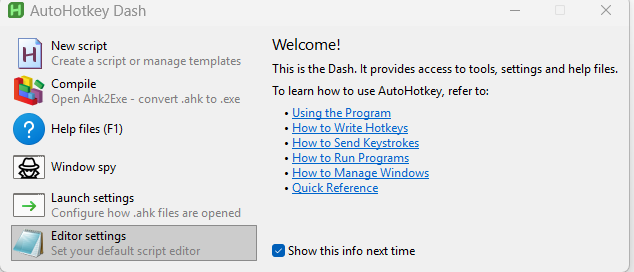
The AutoHotkey Dash. Editor settings chooses the program that edits scripts; Window spy shows a window's name and controls, which helps when a macro works with other programs.
Any text editor will do. A code editor with AutoHotkey support colours the code and catches mistakes: Visual Studio Code with an AutoHotkey v2 extension, or Notepad++, for instance.
Learning more, and a caution
Tools > Automation API lists everything a macro can ask AhkWord to do, a recorded macro shows the calls for what you did, and AutoHotkey's own documentation covers the language.
A macro is a program, and it can do anything a program can on your computer. Run, or hook to an event, only macros you wrote yourself or got from someone you trust.
Next
- The User guide, starting with opening and saving documents.
- For legal drafting, if you write pleadings, motions or contracts.
- Troubleshooting, if the first start doesn't go as described.