For legal drafting
AhkWord was made with lawyers and contract drafters in mind. This page gathers what matters most for pleadings, motions and agreements, with links to the details.
Numbered paragraphs that survive cut and paste
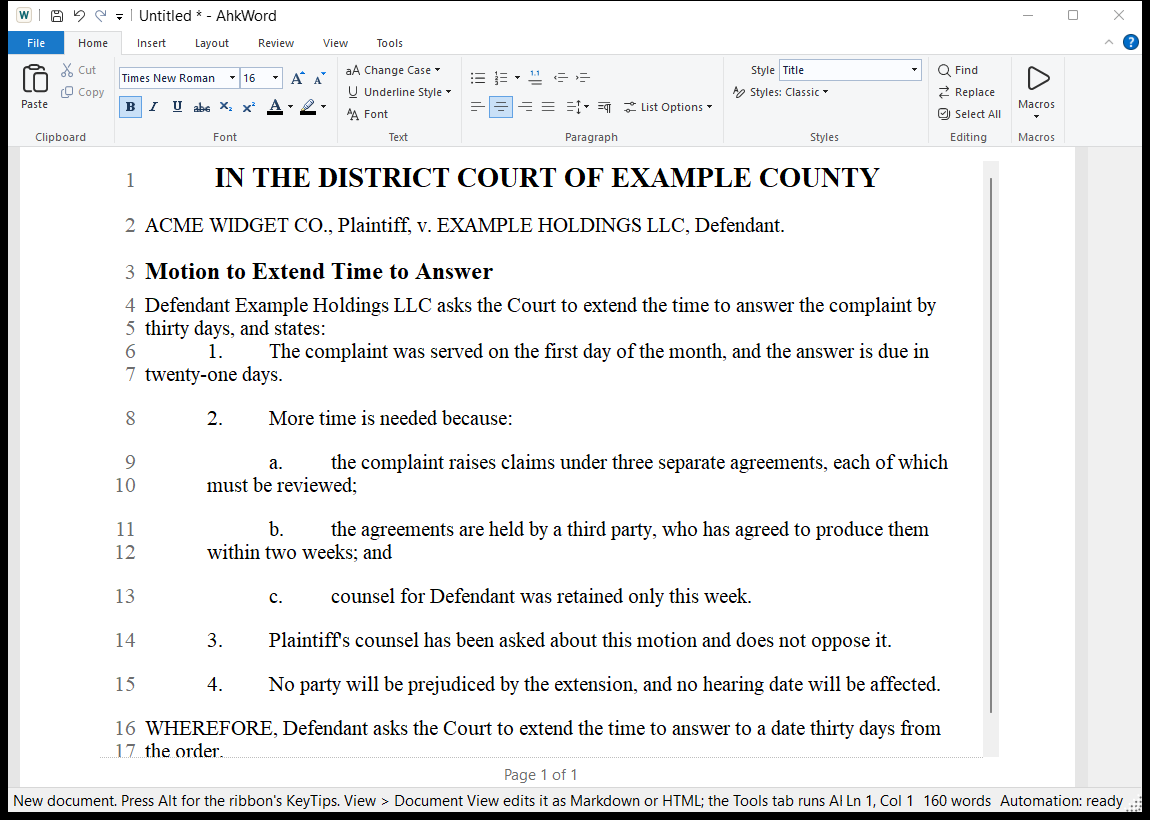
Court papers and contracts number their paragraphs, and the numbers must stay right as paragraphs are moved, added and deleted. In AhkWord, numbering belongs to the paragraph's style: give paragraphs the Numbered Paragraph style (or your own numbered style) and they are numbered 1., 2., 3.
- Cut a paragraph and the ones after it close up; paste it elsewhere and it joins the numbering where it lands. Undo takes back the paste and its numbers together.
- The numbering runs on over headings and quotations between numbered paragraphs, and starts again only where you say.
- Tab makes a paragraph a point under the one before it: (a), (b) under 4.; Shift+Tab takes it back out.
- No numbering leaves a paragraph of the style unnumbered, such as a block quotation or a list of items typed as a., b., c., and it stays so when styles are changed.
Lists and numbering explains it all. For outlines numbered 1.1 and 1.1.1, use legal numbering.
Your firm's or the court's styles
A firm or court often has its own paragraph style: a particular indent, double spacing, numbering. Use it in every new document with Home > Styles > Copy Styles from Document: pick a document that has the style, tick it and Also for new documents. See Styles.
Pleading paper: line numbers
Layout > Line Numbers numbers the lines in the margin, continuously or restarting on each page, every line or every fifth, and leaves out the paragraphs you choose. The numbers are the printed lines, so they match the paper and the PDF; Rte.PrintedLineAt(position) tells a script a passage's page and line for citing. See Line numbers.
Court papers from templates
File > New from Template > Court Paper makes a court paper with its caption and a certificate of service, asking for the court, the county or district, the parties, the case number and the paper's title. Insert from Template adds a Caption, a Signature Block or a Certificate of Service to a paper you are writing. Your own name, address, phone and e-mail are remembered; the case's details are asked for each time. Make your own templates from papers you have filed: see Templates.
Make Court Paper your court's
The built-in Court Paper is a generic starting point, not any court's required format. Courts differ in their captions, margins, line numbering, signature blocks and certificates of service: adapt it to each court you file in, and check it against that court's local rules. Adapting the built-in templates shows how, keeping one template for each court.
Working with Word
Opposing counsel, courts and clients use Word. AhkWord opens and saves .docx files with their styles, numbering, indents, spacing, tables, headers and footers, and line numbers, and Word numbers AhkWord's numbered paragraphs as its own lists. A paper can go back and forth without its formatting falling apart. See File formats and converters.
Exhibits and filing
- Export as PDF (Layout tab) makes the PDF to file.
- The PDF on save macro makes a PDF beside the document each time it is saved, and Folder to PDF makes PDFs of a whole folder. See Automation.