Line numbers
Layout > Line Numbers numbers the lines in the left margin, as Word does, for pleading paper and contracts:
- Continuous, or Restart Each Page; None turns them off.
- Line Numbering Options: the first number, numbering every line or only every 5th (count by), and the distance from the text.
- Suppress for Current Paragraph leaves out paragraphs such as headings. Lines in tables and page breaks aren't counted.
The numbers are printed (also in Print Preview and PDF), numbering the printed lines, and saved in RTF, Word and OpenDocument files, where Word and LibreOffice show and print them.
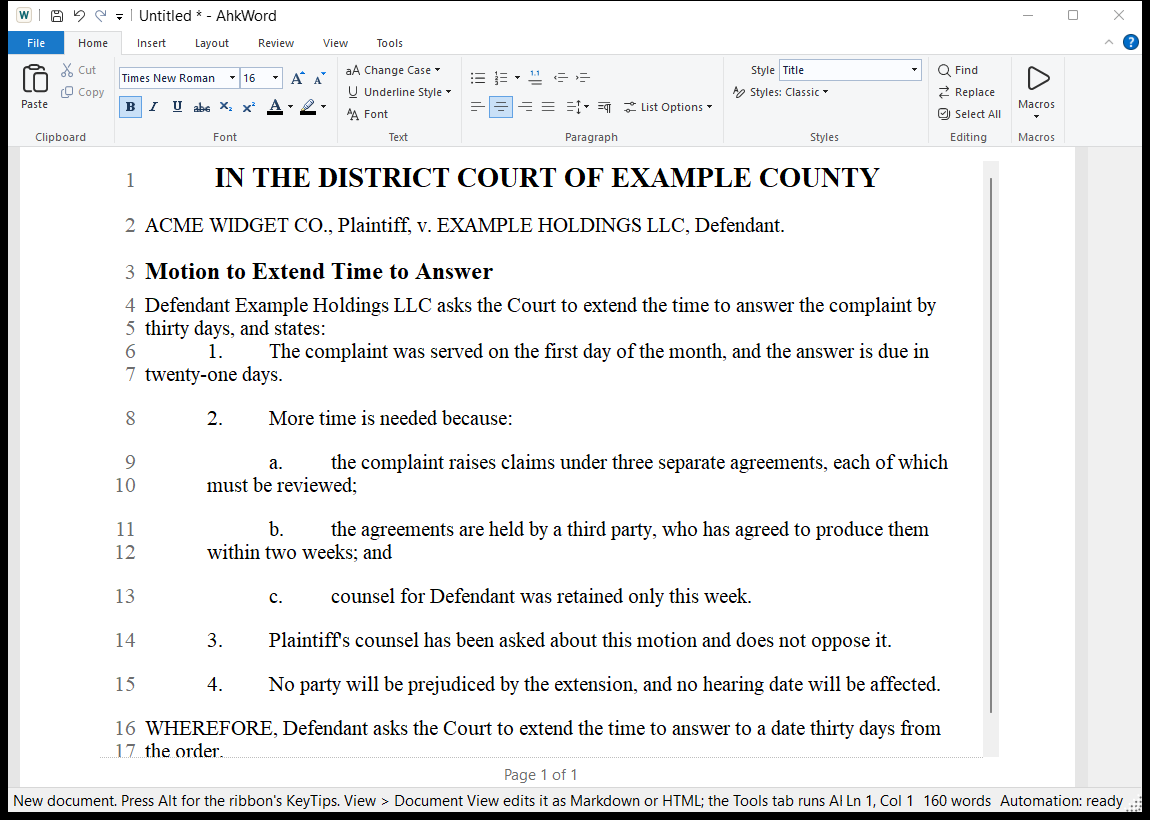
With Print Layout on (the default), the numbers on screen are the printed ones, at any zoom. With it off, lines wrap at the window's edge and a line's number on screen can differ from its printed number; printing and PDF always number the printed lines.
Citing a page and line
A script can ask where a passage is printed: Rte.PrintedLineAt(position) gives its page and line, such as 3:12.
Which paragraphs are left out is kept in RTF, and in Word and OpenDocument files written through Word or LibreOffice; HTML, Markdown, pandoc and the built-in converter keep the line numbering but not that. OpenDocument has no first number: its lines start at 1.